
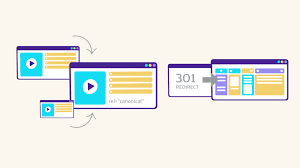
Understand Canonical vs 301 Redirects: When to Use Each for SEO
Search engine optimization (SEO) is a critical part of maintaining a successful website. Properly managing URLs and content duplication can have a significant impact on search rankings, crawl efficiency, and user experience. Two of the most commonly used techniques for handling duplicate content and URL management are canonical tags and 301 redirects. While both aim to guide search engines, they serve different purposes, and knowing when to use each is essential for effective SEO.
Understanding Canonical Tags
A canonical tag, implemented in the HTML <head> section of a webpage, tells search engines which version of a page is the preferred or “canonical” version. This is particularly important when multiple URLs have similar or identical content.
For example, a website may have the same article accessible via:
- www.example.com/blog/seo-tips
- www.example.com/blog/seo-tips?ref=homepage
Without a canonical tag, search engines might treat these URLs as separate pages, potentially splitting ranking signals. By adding a canonical tag pointing to the preferred URL (www.example.com/blog/seo-tips), webmasters signal which page should be prioritized in indexing and ranking.
Benefits of Canonical Tags
- Avoids Duplicate Content Penalties: Search engines often penalize duplicate content or fail to rank either version highly. Canonical tags prevent this issue by consolidating signals.
- Preserves Link Equity: Backlinks pointing to different versions of a page are consolidated to the canonical URL, improving overall authority.
- Improves Crawl Efficiency: Search engines spend less time crawling duplicate pages, allowing them to focus on unique content.
When to Use Canonical Tags
- When similar content exists on multiple URLs.
- For paginated content, where different pages contain overlapping information.
- When tracking parameters or filters create multiple URL versions of the same page.
- For syndicating content on other domains while indicating the original source.
Understanding 301 Redirects
A 301 redirect is a permanent server-side redirect that automatically sends users and search engines from one URL to another. Unlike canonical tags, which only signal the preferred URL, 301 redirects transfer both visitors and ranking signals to the new page.
For instance, if www.example.com/old-page is outdated or merged into www.example.com/new-page, implementing a 301 redirect ensures that anyone accessing the old URL is sent directly to the new one.
Benefits of 301 Redirects
- Transfers Ranking Power: A 301 redirect passes most of the original page’s SEO authority to the new URL, maintaining rankings.
- Improves User Experience: Visitors are automatically sent to the correct page, preventing 404 errors or confusion.
- Maintains Traffic and Backlinks: Links pointing to the old URL still contribute value to the new page.
When to Use 301 Redirects
- When permanently moving content to a new URL.
- For website redesigns or domain changes.
- When consolidating multiple pages into a single page.
- To fix broken or outdated URLs that receive traffic or backlinks.
Key Differences Between Canonical Tags and 301 Redirects
| Feature | Canonical Tag | 301 Redirect |
| Purpose | Signals preferred version to search engines | Moves users and search engines to a new URL permanently |
| User Impact | Users remain on the original page | Users are automatically redirected |
| SEO Value | Consolidates ranking signals | Transfers ranking power to the new page |
| Implementation | HTML <link rel=”canonical” href=”URL”> | Server-side redirect via .htaccess, Nginx, or CMS |
| Best For | Duplicate or similar content | Permanent URL changes or page consolidation |
Practical Examples
Scenario 1: Duplicate Content Across URLs
An e-commerce site lists the same product with different tracking parameters:
- www.shop.com/product?color=red
- www.shop.com/product?color=blue
Here, a canonical tag pointing to the main product URL is ideal. It ensures search engines recognize a single preferred page without disrupting the user experience.
Scenario 2: Page Moved to a New URL
A blog moves from www.example.com/blog/seo-basics to www.example.com/seo-guide. Implementing a 301 redirect ensures users and search engines are automatically sent to the new URL, maintaining SEO authority.
Scenario 3: Content Syndication
If an article is published on multiple websites, adding a canonical tag pointing to the original source prevents duplicate content issues while allowing syndication.
Best Practices for Canonical Tags and 301 Redirects
- Always Use Absolute URLs: When specifying a canonical tag, include the full URL to avoid ambiguity.
- Avoid Conflicting Signals: Do not use both a 301 redirect and a canonical tag on the same page pointing to different URLs. This can confuse search engines.
- Monitor Crawl Errors: Use tools like Google Search Console to ensure redirects are functioning properly and canonical URLs are being respected.
- Consolidate Duplicate Content: Regularly audit your website for duplicate or similar pages to determine whether a canonical tag or 301 redirect is appropriate.
- Focus on User Experience: Always ensure redirects and canonical tags do not create loops or lead users to irrelevant pages.
Common Mistakes to Avoid
- Using canonical tags incorrectly on pages that require a redirect.
- Redirect chains or loops that dilute SEO value.
- Ignoring parameterized URLs that create unnecessary duplicates.
- Applying 301 redirects for temporary content, where a 302 redirect would be more appropriate.
Personal Perspective: Why Understanding Both Matters
In my experience working with multiple websites, I have seen SEO performance improve significantly when canonical tags and 301 redirects are implemented correctly. Mismanaged URLs can cause content dilution, indexing issues, and even ranking drops. Using canonical tags for similar content and 301 redirects for permanent changes ensures both users and search engines navigate the website efficiently, a strategy often recommended by Leading SEO Companies in USA for optimal SEO results.
Many businesses overlook the subtle differences between the two, assuming they are interchangeable. However, understanding when to use a canonical tag versus a 301 redirect is a crucial part of a comprehensive SEO strategy. Proper use safeguards rankings, consolidates link equity, and delivers a better experience for visitors.
Conclusion
Canonical tags and 301 redirects are essential tools in an SEO professional’s toolkit. While canonical tags consolidate signals for duplicate or similar content, 301 redirects ensure users and search engines are permanently directed to the correct page. Both strategies, when used appropriately, improve crawl efficiency, preserve SEO authority, and enhance user experience.
FAQs (Frequently Asked Questions)
What is a canonical tag, and how does it help SEO?
A canonical tag signals to search engines which version of a page is preferred when multiple URLs have similar content. It consolidates ranking signals, prevents duplicate content issues, and improves crawl efficiency without affecting user navigation.
When should I use a 301 redirect instead of a canonical tag?
Use a 301 redirect when a page is permanently moved or merged with another page. It automatically sends users and search engines to the new URL, transferring ranking authority and preserving traffic from the old page.
Can using both canonical tags and 301 redirects together cause issues?
Yes, applying both on the same page pointing to different URLs can confuse search engines. It may result in inconsistent indexing and loss of ranking signals. Use one method per scenario based on whether content is duplicate or permanently moved.
How do canonical tags impact link equity?
Canonical tags consolidate link equity from multiple duplicate pages to the preferred URL. This ensures that backlinks pointing to various versions of a page contribute to a single page’s authority, improving its ranking potential.
Are 301 redirects permanent, and can they be reversed?
A 301 redirect is intended to be permanent, transferring SEO value to the new URL. While it can technically be reversed, doing so frequently can confuse search engines and negatively impact rankings, so it should be used only for permanent changes.
Can canonical tags be used across different domains?
Yes. Canonical tags can point to pages on a different domain, which is useful for content syndication. This tells search engines which version is the original source, preventing duplicate content issues while allowing the content to appear on multiple sites.
Do 301 redirects affect page load speed?
301 redirects add a small delay because the server must process the redirect before loading the final page. While usually minimal, excessive redirects or redirect chains can slow down pages, so it’s important to minimize unnecessary 301s for better user experience and SEO.
How can I check if my canonical tags and 301 redirects are working correctly?
You can use tools like Google Search Console, Screaming Frog, or browser developer tools to verify canonical tags and 301 redirects. Checking ensures search engines are recognizing preferred URLs, redirects are functioning properly, and SEO value is maintained.




